Projects·Tasks

Task management built for client work

Capture tasks in plain language, break them into subtasks, assign owners, set priorities and track every minute against the project they belong to.

Free forever plan. No credit card.

Plate 00 · TasksMy Day groups today's work under the board it belongs to, so a personal to-do list and a client project are never the same pile.
My Day in MoodLens showing prioritised task cards grouped by board
01

Everything due today, grouped by the project it belongs to

My Day pulls work from every board into one screen and keeps it labelled by source. Each card carries its priority, its estimate, its subtask progress and how long is left — enough to triage a morning without opening anything.

Included

  • 01Critical, high and medium priority badges
  • 02Hour estimates and days remaining on the card
  • 03Subtask progress shown as 0/3 before you open it
  • 04A focus timer bar that fills as you work
  • 05Grouped under the board each task came from
02

Let Moody write the description and the subtasks

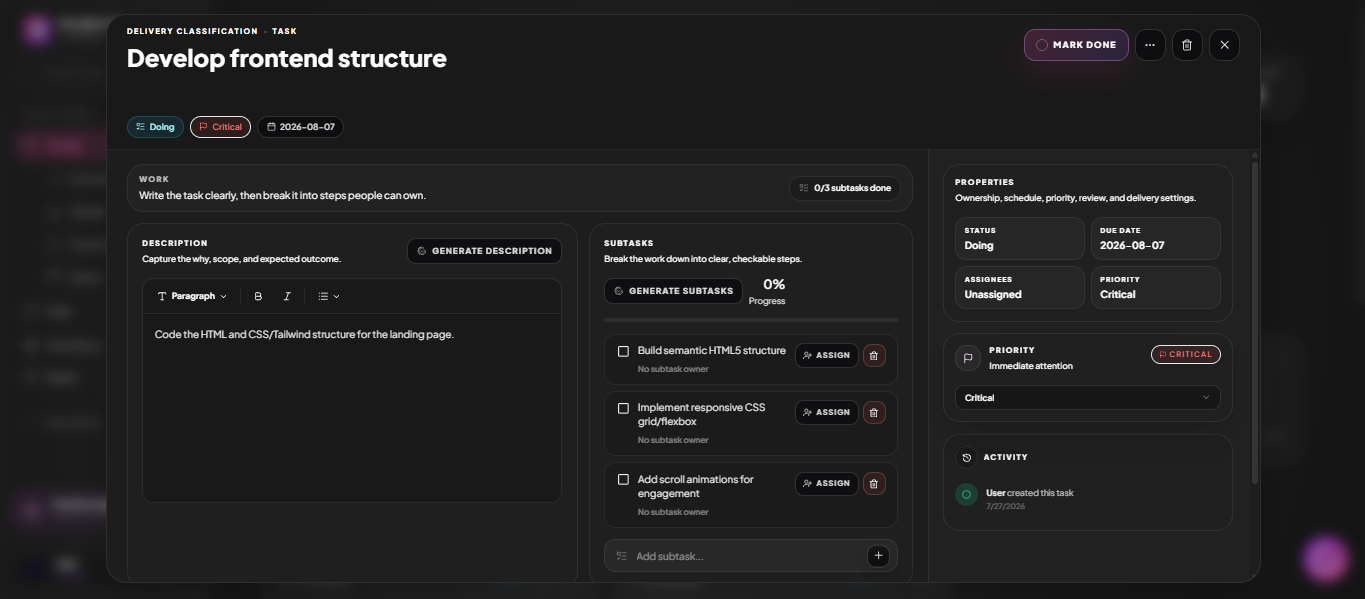
Open a task and you get Generate Description and Generate Subtasks. Give it a one-line title and it drafts the scope and breaks the work into ownable steps — which you then edit, assign and reorder like anything else.

See it below
Plate 01 · Continues 02One panel holds the description, generated subtasks, properties and the full activity trail.
A MoodLens task detail panel with AI-generated subtasks, properties and activity

What to look for

  • Generate Description from a bare title
  • Generate Subtasks that split the work into steps
  • Assign each subtask to a different person
  • Live progress percentage across subtasks
  • Everything editable — nothing is locked to the AI output
03

Properties and history in the same panel

Status, due date, assignees and priority sit in a properties rail beside the work itself, and every change is written to an activity log. Nobody has to ask who moved it or when it changed.

  • Status, due date, assignees and priority
  • Priority guidance — "Critical: immediate attention"
  • Full activity log of every change
  • Threaded comments with @mentions
  • Attachments, cover images and related links
04

Know what it cost

Start a timer on any task, or log time after the fact. Those hours roll straight into the project budget and onto the invoice, so billing reflects what actually happened instead of what someone remembers.

Also here

  • 01Per-task timers
  • 02Manual time entries
  • 03Billable hours feed budgets and invoices

Straight answer

Can I import tasks from another tool?

Yes. MoodLens imports boards and tasks from Trello, Asana, Jira, Notion and ClickUp, including columns, assignees and descriptions.

Also asked

Tasks, answered

Q2
Do tasks support recurring schedules?Yes. Tasks can repeat on a schedule, and automations can create tasks on a recurring or event-driven trigger.

Run the whole client lifecycle in one workspace.

Tasks is one part of it. Plan the work, keep clients informed, track the budget and get paid — without another subscription.

Start free

Free to start. No credit card required.