The client wants a launch date. You want to give one you can keep. This guide shows how long websites usually take, how the weeks split across discovery, design, build and launch, the three things that push launch back, and a 6-week timeline you can put straight on a board.
The short answer
A freelance web designer usually needs 2 to 8 weeks for a website. A 5–15 page small business site typically takes 2 to 6 weeks with a freelancer and 4 to 16 weeks with an agency (Expertsure, October 2026). Plan the project in phases (discovery, design, build, content and launch), give every phase a due date and a named person on the client side, and protect the date from its usual threats: missing content, slow feedback and extra requests. In MoodLens To-do you can plan the phases as tasks with hours and dates, see them in the Timeline view and let the client follow progress from a live link.
From kickoff to launch
- 1Kickoff and goals
- 2Design approved
- 3Content received
- 4Pages built
- 5Tested on staging
- 6Launched
How long websites take, by type
There is no single answer, but published ranges agree on the order of magnitude. A few pages built by a professional take days to a couple of weeks; a small business site takes a few weeks; an online shop or a custom build takes months.
Use the ranges to check that a date is realistic, not to set it. Your own date should come from the phases of the project and from how quickly the client can deliver their part.
- The ranges suggest freelancers are usually faster than agencies on small sites, partly because fewer people approve each step.
- Much of the gap between the low and the high end of a range is waiting: for content, feedback and approvals.
| Project | Typical timeline | Source |
|---|---|---|
| Simple brochure site (1–5 pages), built by a professional | 1–2 weeks | Elementor, updated June 2026 (vendor) |
| Small business site (5–15 pages), freelancer | 2–6 weeks | Expertsure, October 2026 |
| Small business site (5–15 pages), professional | 4–8 weeks | Elementor, June 2026 (vendor) |
| Any website, web design agency | 4–16 weeks | Expertsure, October 2026 |
| Small online shop (under 50 products), professional | 8–12 weeks | Elementor, June 2026 (vendor) |
Where the weeks go: a 6-week timeline template
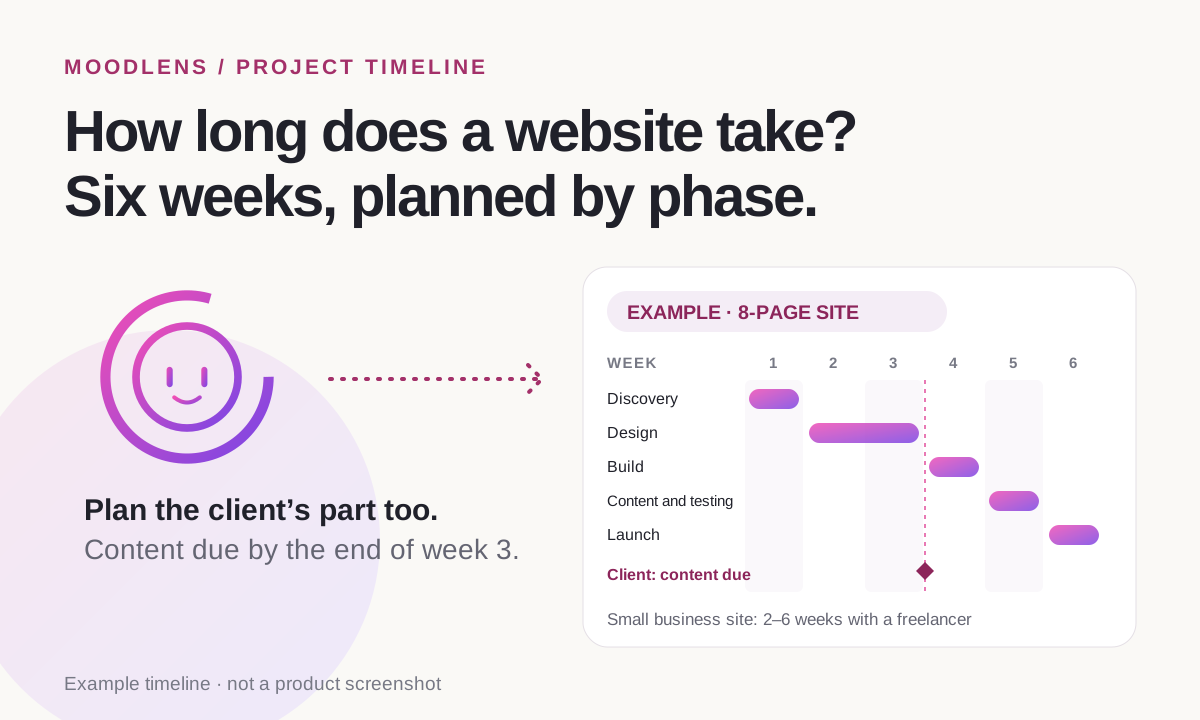
Most website projects move through the same five phases. The template below is an example for an 8-page small business site with a CMS. Change the weeks to fit your project, but keep the last column: every phase needs something from the client, and the timeline only holds if those items have dates too.
| Week | Phase | What happens | Needed from the client |
|---|---|---|---|
| 1 | Discovery | Kickoff call, goals, sitemap and content plan | Goals, sites they like, logins |
| 2 | Design | Home page design and visual direction | Feedback within 2 working days |
| 3 | Design | Inner page templates, one revision round | Final copy and images |
| 4 | Build | Pages built in the CMS, forms and integrations | Answers to open questions |
| 5 | Content and testing | Content entered, speed, mobile and accessibility checks | A review of the staging site |
| 6 | Launch | Go live, redirects, handover and training | Final approval and the balance payment |
The three things that push launch back
Projects rarely run late because the design or the build took longer than planned. They run late because work stops while someone waits. Elementor’s June 2026 guide puts it plainly: “The number one reason website projects stall is a lack of prepared content.”
- Missing content: copy, photos and logins that arrive late. Ask for them in the first week with a deadline, not when the build is ready for them.
- Slow feedback: every day a design waits for approval is a day added to the launch date. Agree a feedback window, such as two working days, in the contract.
- Extra requests: a new page or feature halfway through. Price it and add its time to the plan before anyone starts, so the date moves on purpose.
Turn the timeline into a plan you can run
A timeline in a proposal is a promise. A timeline on a board is something you can check every day. Break each phase into tasks small enough to finish in a day or two, and make the client’s part visible on the same board.
- One column per phase, or a simple flow such as To do, Doing, Review and Done.
- A task for every deliverable, with an estimate in hours and a due date.
- Client tasks on the board too, such as “Send final copy”, with their own due dates, so a delay shows up the day it happens.
- A weekly check: what moved, what is waiting on whom, and whether the launch date still holds.
How MoodLens keeps the timeline honest
MoodLens To-do started as a project management platform, so the plan lives on boards with sprints, tasks, due dates and time tracking, right next to the client’s proposal, contract and invoices.
Describe the project to Moody, the built-in AI, and it prepares the board workflow, starter tasks with estimated hours and a budget, which you review before anything is created. Then switch the board to the Timeline view to see tasks laid out by their planned or due dates, two weeks at a time, or to the Calendar view.
Time tracked on each task shows how the real hours compare with the estimate while there is still time to act. And with a live client link, your client sees what is done, what is in progress and what changed since their last visit, without asking.
- Moody’s plan is a draft: nothing is created until you choose to create the project.
- MoodLens does not set your dates for you. Estimates come from you or from Moody’s suggestions, and you can change them.
- The live client link is included in Plus and Pro.
A timeline in a document vs. a timeline on a board
| Category | MoodLens | Timeline in a document |
|---|---|---|
| When the plan changes | Tasks and dates move as the work happens | Someone has to rewrite the document |
| Who is waiting on whom | Client tasks with their own due dates | Buried in email threads |
| Real hours vs. estimate | Time tracked on every task | Guessed at the end |
| What the client sees | A live link with progress | A PDF from the first week |
| Extra requests | Approved as a new proposal, then added as tasks | Squeezed in without moving the date |
Frequently asked questions
How long does it take to build a 5-page website?
With a professional, a simple brochure site of 1 to 5 pages often takes 1 to 2 weeks (Elementor, June 2026). Add time if the client still has to write the copy or several people need to approve the design.
How long does a small business website take?
A 5–15 page small business site typically takes 2 to 6 weeks with a freelancer (Expertsure, October 2026), and 4 to 8 weeks with a professional according to Elementor’s June 2026 guide. Agencies usually take longer, from 4 to 16 weeks.
What delays website projects the most?
Missing content is the most common reason, followed by slow feedback and extra requests added halfway through. Ask for content in the first week, agree a feedback window and price extra work before you start it.
Should the timeline go in the proposal or the contract?
Both. The proposal shows the phases and the launch date the client is buying. The contract makes those dates depend on the client’s part, such as delivering content and feedback on time.
Can my client see the project timeline?
In MoodLens To-do, yes, on Plus and Pro. Share a live client link and your client sees progress by status, what changed since their last visit and the latest update, without an account.
Related MoodLens workflows
Sources and methodology
Timelines come from the guides linked below. They are typical ranges, not a survey: Expertsure covers UK freelancers and agencies, and Elementor sells a website builder. The 6-week plan is an example. MoodLens features were checked against the product in November 2026.