Client work is not a board full of tasks. It is a commercial relationship that begins with a client, moves through scope, approval, delivery, and signatures, and only finishes when the invoice is paid and the history is easy to recover.
Client work management
Client work management: how agencies go from proposal to payment
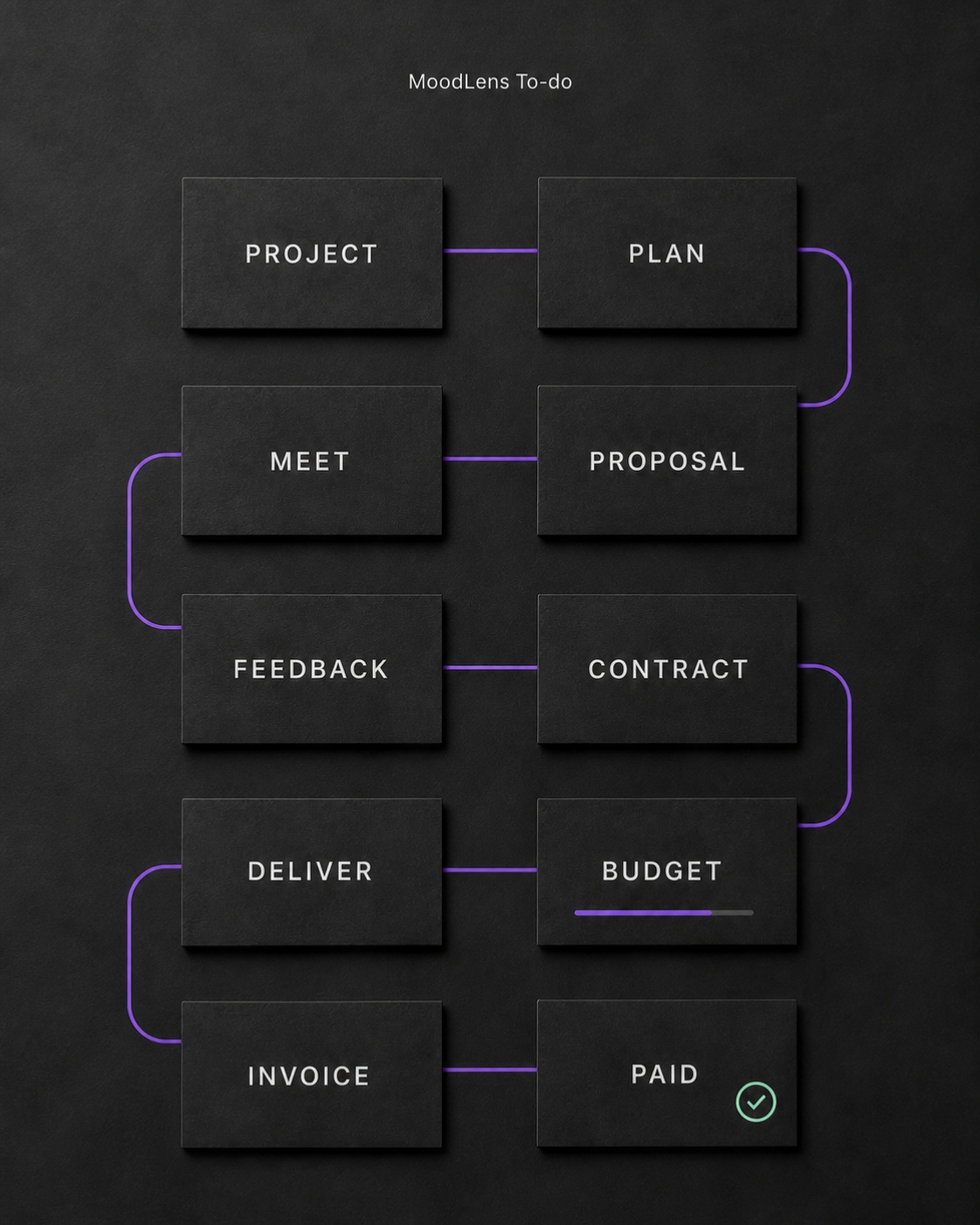
The complete client-work lifecycle
- 1Client
- 2Project
- 3Scope and budget
- 4Proposal
- 5Client sharing
- 6Feedback and revisions
- 7Planning
- 8Tasks and milestones
- 9Meetings
- 10Contract
- 11Signatures
- 12Delivery
- 13Budget tracking
- 14Invoice
- 15Payment
Quick answer: client work is bigger than task management
Client work management is the complete operating flow that connects a client record to the project, commercial agreement, delivery work, invoice, payment, and history. Task management is one important layer inside that flow, but it is not the whole system.
A card reaching Done can mean the deliverable is ready. It does not prove that the client approved it, the contract is signed, the budget is healthy, the invoice was viewed, or the payment arrived. Agencies and freelancers need those events to remain connected because each one changes what should happen next.
The practical goal is not to force every activity into one screen. It is to keep one reliable context so the team does not repeatedly copy the client name, project scope, agreed price, approval status, and billing details between disconnected tools.
The complete client-work lifecycle
A useful client-work system should follow the relationship in the order it actually develops: client, project, scope and budget, proposal, client sharing, feedback and revisions, planning, tasks and milestones, meetings, contract, signatures, delivery, budget tracking, invoice, and payment.
Not every business uses those stages in exactly the same sequence. A retainer may be contracted before detailed planning, while a fixed-scope project may need a proposal and deposit first. What matters is that moving a stage does not break the connections between the people, documents, decisions, work, and money.
- Before delivery: qualify the client, define the project, price the work, and agree on what success means.
- During delivery: plan tasks and milestones, record decisions, collect feedback, and monitor time and budget.
- After delivery: obtain final approval, issue the invoice, collect payment, and preserve a usable audit trail.
Why disconnected tools create operational debt
A flexible stack can work. The cost appears when each system owns only a fragment of the truth: contacts in a CRM, the brief in a document, feedback in email, tasks on a board, signatures in an e-sign app, time in a tracker, invoices in accounting software, and payments in a provider dashboard.
Every boundary creates a handoff. Someone must copy a value, attach a link, reconcile a status, or explain which version is current. Those handoffs are easy to overlook when the agency has three clients and expensive when it has thirty.
The recurring failure is not simply app switching. It is context drift: the signed scope differs from the board, the approved revision is buried in email, or the invoice describes work differently from the project. A connected system reduces that drift by making each stage reuse the same client and project context.
- Duplicate client and project data creates avoidable errors.
- Scattered feedback makes approval and revision history hard to prove.
- Detached financial data hides whether delivery is still profitable.
- Manual status updates slow client communication and billing.
Step 1: create the client record and project foundation
Start with one client record that holds the contact information the team is allowed to use. Create the project from that record, then define the project name, owner, dates, currency, budget, deposit, payment terms, and a concise description of the outcome.
This foundation prevents small inconsistencies from spreading. The currency chosen here should be the currency used in the proposal, contract, budget, and invoice. The client identity should not have to be retyped at every stage. Access should also be explicit: internal collaborators need the working context, while the client should only see approved surfaces.
- Client name, primary contact, email, phone, organization, and role.
- Project owner, start and target dates, currency, and budget.
- Pricing model, deposit, tax assumptions, and payment terms.
- Internal visibility and the client-facing sharing boundary.
Step 2: turn scope and budget into a proposal
A proposal should translate the client problem into a clear commercial plan. It needs the intended outcome, deliverables, exclusions, timeline, responsibilities, revision policy, price, and next decision. A polished document that leaves those points vague only delays the disagreement.
Create the proposal inside the same project context whenever possible. That lets the agreed scope inform the delivery plan later, and it keeps changes visible. In MoodLens Docs, the team can prepare the proposal, keep project notes nearby, and use Moody to improve structure or clarity while a person remains responsible for the final commercial promise.
- State the result and acceptance criteria, not only a list of activities.
- Separate included deliverables from assumptions and exclusions.
- Show price, currency, deposit, milestones, and payment schedule clearly.
- Give the client one obvious next action: approve, comment, or request a revision.
Step 3: share securely, collect feedback, and control revisions
Client feedback should arrive next to the document or deliverable it changes. When comments are split between email, chat, and calls, the team loses the sequence of what was requested, accepted, or superseded.
Use client-safe sharing instead of exposing the internal workspace. A good review flow identifies the document version, records the client action, distinguishes a question from a change request, and preserves the decision after the work moves forward.
MoodLens connects shared documents, review links, client feedback, project notes, files, and clips to the project. The team can revise the proposal or deliverable without rebuilding the client context or relying on an inbox as the approval system.
Step 4: plan delivery, milestones, and meetings
Once the commercial direction is clear, translate it into milestones and owned work. A milestone should represent an outcome the client can recognize. Tasks then describe the actions required to reach it, with owners, priorities, estimates, dependencies, and deadlines.
Meetings belong in the same operating loop. The valuable output of a call is not the recording alone; it is the decisions, risks, owners, and follow-up work that change the plan. Meeting context should therefore be easy to turn into tasks, notes, and client updates.
MoodLens supports boards, backlog, sprints, calendar and project views alongside calls, meeting context, docs, clips, Moody, and specialized AI Employees. AI can prepare or summarize work, but the team remains accountable for client commitments and final decisions.
- Break the approved scope into visible milestones and deliverables.
- Assign one accountable owner for every next action.
- Record decisions where the affected work can reference them.
- Convert meeting follow-up into scheduled work before the context disappears.
Step 5: create the contract and collect secure signatures
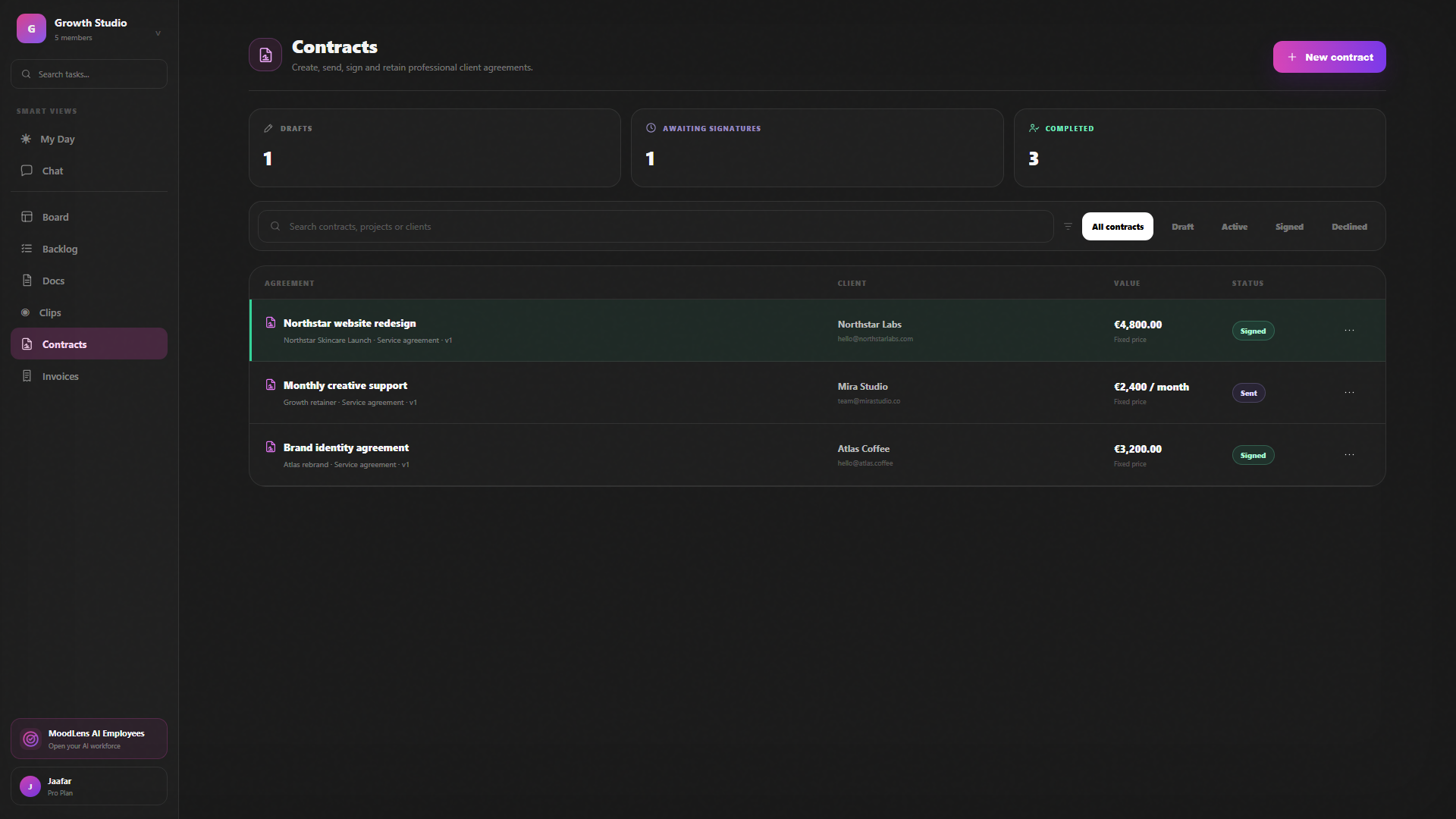
The contract should reflect the commercial facts already agreed in the project: parties, scope, fees, currency, timing, payment terms, responsibilities, ownership, confidentiality, termination, and signature requirements. Re-entering those facts in an unrelated system increases the chance of a mismatch.
MoodLens can start a contract from one of 32 built-in templates, a reusable workspace template, a Moody-assisted draft, or a blank agreement. Each required signer receives a separate link and verifies access by email before typing, drawing, or uploading a signature. The completed record includes a locked PDF and electronic-signature audit certificate.
Templates and AI drafting are not legal advice. A qualified person must review every term, confirm the signer authority, and decide whether the agreement and electronic-signature method fit the jurisdiction and risk of the transaction.
Step 6: deliver while tracking time, cost, and remaining budget
Delivery data becomes financially useful when it remains tied to the agreed project. Track billable and non-billable time, planned value, costs, and the remaining budget while the work is active, not weeks later when someone prepares an invoice.
This gives the team an early warning when revision volume, meetings, or unexpected tasks begin to consume the margin. It also creates a cleaner client conversation: the account owner can explain what changed using the same project history rather than reconstructing it from memory.
- Compare estimated and actual effort before a milestone closes.
- Separate billable delivery from internal or non-billable work.
- Review scope changes against the contract and approval history.
- Keep the client update aligned with the live project status.
Step 7: create the invoice and collect payment
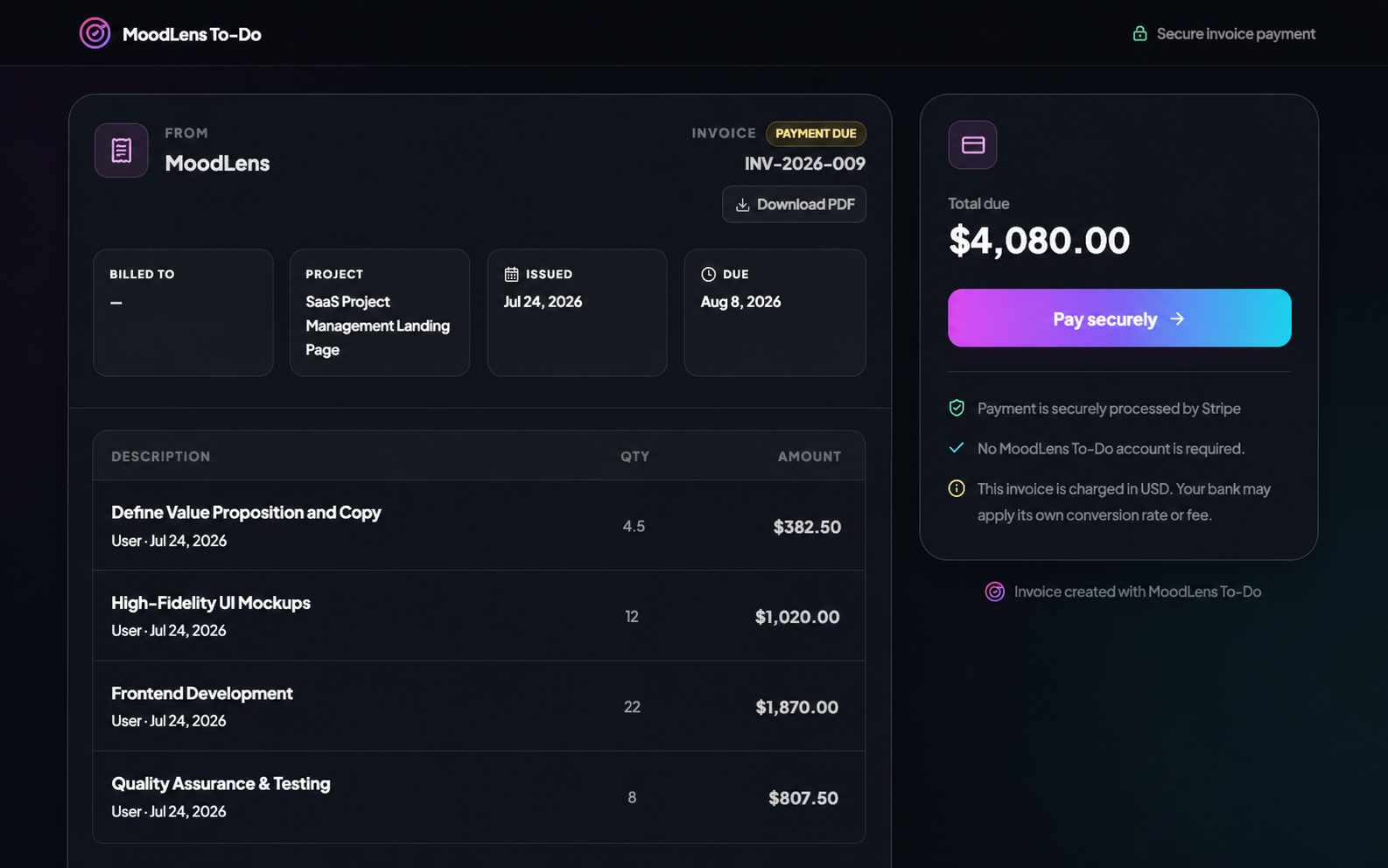
An invoice should be the financial conclusion of the project context, not a fresh reconstruction. Bring forward the correct client, project, currency, commercial terms, billable items, tax, discounts, due date, and linked agreement, then review them before sending.
MoodLens can create a project-linked invoice and, after a contract is fully signed, carry the relevant context into a protected invoice draft. The invoice ledger tracks operational status such as sent, viewed, due, overdue, or paid so the team knows the next action.
Payment methods depend on workspace setup. Stripe can provide provider-hosted card checkout, NOWPayments can provide cryptocurrency checkout, and manual invoices can record bank or offline settlement instructions. The payment provider processes the funds; MoodLens connects the invoice and status to the work.
Where ClickUp, Notion, Jira, and monday.com fit
ClickUp, Notion, Jira, and monday.com are capable products, and it would be inaccurate to describe them as simple internal task lists. ClickUp documents CRM and client-communication workflows. Notion combines projects, databases, documents, and AI. Jira is a strong planning and tracking system for structured work, especially in software delivery. monday.com offers work management and separate CRM capabilities.
The useful buying question is not whether these tools can support client work. They can. Ask how much of your exact proposal-to-payment lifecycle is native, how much must be configured, and how many adjacent products or integrations must remain synchronized.
Choose the system that matches your hardest workflow. A product engineering team may prefer Jira depth. A documentation-heavy team may prefer Notion flexibility. A team already invested in ClickUp or monday.com may benefit more from improving its configuration than migrating. MoodLens is designed for agencies, freelancers, consultants, and service teams that want the client relationship, delivery work, contracts, invoices, and payments to share one project context.
A practical checklist for choosing client work management software
Evaluate tools with one real project instead of a generic demo. Use a representative client, proposal, revision, meeting, contract, billable task, invoice, and payment scenario. The gaps that appear during that test are more informative than a long feature list.
- Can a client and project be created once and reused across every later stage?
- Can clients review selected content without seeing internal notes or unrelated work?
- Are proposal revisions, approvals, decisions, and files easy to recover?
- Can the delivery plan reference the agreed scope, milestones, and contract?
- Are signer identity, timestamps, completed documents, and audit history preserved?
- Can time, cost, budget, and billable work be reviewed before invoicing?
- Can an invoice carry forward the correct project and contract context?
- Can the team see whether the invoice was sent, viewed, overdue, or paid?
- Are payment processing responsibilities and fees clear?
- Can records be exported, permissions controlled, and access removed safely?
How MoodLens keeps the same context from proposal to payment
MoodLens To-do is being built around the operating flow of client work rather than treating billing and client collaboration as unrelated add-ons. The client, project, documents, tasks, meetings, contract, budget, invoice, and payment history remain part of one connected record.
That continuity is the product advantage: same client, same project, same documents, same budget, and the same context from the first proposal to the final payment. Moody and specialized AI Employees can work with that approved workspace context, while people keep responsibility for scope, legal terms, client communication, and financial decisions.
The honest test is simple: run one real project through the entire lifecycle. If the team spends less time copying context, the client has a clearer review path, and the invoice is easier to produce and reconcile, the system is doing more than making the task board look organized.
Connected client-work system vs a configured tool stack
| Category | MoodLens | Typical configured stack |
|---|---|---|
| Starting point | Client, project, scope, currency, budget, deposit, and payment terms share one context. | Usually starts with a board, page, issue, or CRM record that the team configures around its process. |
| Proposal and feedback | Docs, secure client sharing, review links, and feedback stay attached to the project. | Can be handled well, but may rely on templates, permissions, integrations, or a separate proposal tool. |
| Contract and signatures | Moody-assisted drafting, 32 templates, verified signer links, audit history, and a locked completed PDF. | Coverage varies by product and plan; specialist e-signature software is often connected separately. |
| Delivery | Boards, backlog, sprints, tasks, milestones, meetings, docs, clips, and AI assistance use the same project. | General work-management platforms are often strongest here and can be deeply customized. |
| Invoice and payment | The signed agreement and project context can carry into an invoice, status tracking, and payment options. | May require a native add-on, accounting integration, payment integration, or a separate billing system. |
| Operational history | Project, document, contract, signature, invoice, and payment activity remain connected. | History may be distributed across the work tool, CRM, document system, e-sign app, and payment provider. |
Frequently asked questions
What is client work management?
Client work management is the end-to-end system a service business uses to manage a client relationship and its delivery work: client records, scope, proposals, feedback, tasks, meetings, contracts, signatures, budgets, invoices, payments, and the history connecting them.
How is client work management different from project management?
Project management focuses on planning and completing work. Client work management includes that delivery layer, but also covers the commercial and client-facing stages before and after it, including proposals, approvals, contracts, invoicing, and payment.
What should client management software for agencies include?
At minimum, look for connected client and project records, scope and budget fields, client-safe sharing, feedback history, tasks and milestones, meeting follow-up, contracts and signatures, time and budget tracking, invoicing, payment status, permissions, and exportable records.
Can MoodLens replace ClickUp, Notion, Jira, or monday.com?
It can replace part or all of that stack when your priority is one connected client lifecycle. It is not automatically the right replacement for every team: Jira can remain a strong fit for deep engineering workflows, while ClickUp, Notion, and monday.com may suit teams that prefer highly configurable work management. Test one real client project before migrating everything.
Does MoodLens provide legal advice through its contract tools?
No. Moody and the contract templates are operational starting points, not legal advice. You remain responsible for reviewing every term and confirming whether the agreement and electronic-signature method are suitable for your jurisdiction and use case.
Who processes payments made from a MoodLens invoice?
Stripe processes card payments, NOWPayments processes cryptocurrency payments, and manual transfers occur outside MoodLens. MoodLens keeps the invoice and provider status connected to the project but does not hold the funds.
Related MoodLens workflows
Sources and methodology
Competitor descriptions were checked against official product documentation. Features and plans can change, so verify the exact workflow before choosing a tool.