Many freelancers and agencies run client projects in ClickUp, Asana, Notion or Jira. They are excellent tools, built for coordinating a team. Client work has a second party: the client, who needs to approve, sign, follow progress and pay. This guide shows where these tools stop, what teams bolt on to fill the gap, and how to tell whether your setup is costing you.
The short answer
ClickUp, Asana, Notion and Jira are built around coordinating your own team: tasks, docs, sprints and workflows. Client work also needs things that happen with someone outside the team: a proposal the client approves, a contract they sign, a view of progress that hides internal work, an invoice built from the hours, a payment and reminders when it is late. These tools either do not handle those steps or need other apps for them. ClickUp’s own feedback board, for example, lists invoicing as a request open since 2018 that is “not currently in our near future plans”. If you bill clients, look for a tool that covers both sides, or accept the cost of stitching several apps together.
The client side of a project
- 1Proposal approved
- 2Contract signed
- 3Progress shared
- 4Hours tracked
- 5Invoice sent
- 6Payment received
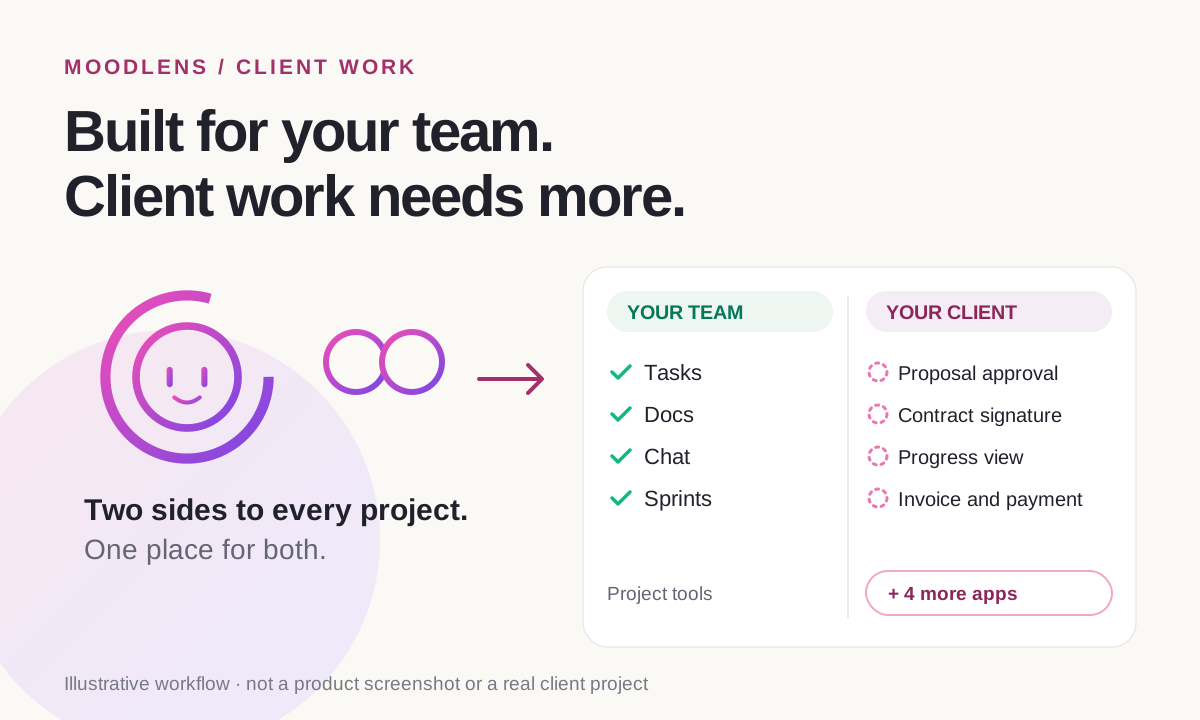
These tools are built for your team. Client work has a second party.
Read how these companies describe their own products and a pattern appears. Each one is about how a team works together. None of them is about the person paying for the work.
| Tool | Its own words | What it is built around |
|---|---|---|
| ClickUp | “Software to replace all software” | One workspace for a team’s tasks, docs, chat and AI |
| Asana | “The OS for human-agent teams” | Coordinating work across teams and AI agents |
| Notion | “Where teams and agents think together” | Docs, wikis and databases you shape yourself |
| Jira | “Turn ideas into forward motion” | Issue and project tracking; it began as a software bug tracker |
That is not a criticism. Coordinating a team is hard, and these tools do it very well. But when you work for clients, half of the project happens with someone outside the team: the client who approves, signs, checks progress and pays. That side is where these tools stop and where extra apps start.
What client work actually needs
A client project is not just a list of tasks. It is a loop that starts with an agreement and ends with a payment, and the client takes part in most of it:
- A proposal the client can approve, with a record of who approved what and when.
- A contract the client signs before the work starts.
- A view of progress for the client that does not expose internal comments and drafts.
- Time tracked against the budget, so you see scope drift while you can still act on it.
- An invoice built from the agreed price or the tracked hours, without retyping.
- A way for the client to pay, and reminders when they do not.
Where ClickUp, Asana, Notion and Jira stop
Each tool handles the internal work well and approaches the client side differently. In practice, teams fill the gaps the same way: with other apps.
- ClickUp: one of the broadest workspaces for a team, with tasks, docs, chat and time tracking. On ClickUp’s own feedback board, invoicing has been requested since 2018 with about 1,400 votes, and in January 2026 ClickUp replied that it is “not currently in our near future plans”. Proposals and contracts with e-signatures are another open request.
- Asana: strong at coordinating teams, goals and workflows. Time tracking is included on its Advanced, Enterprise and Enterprise+ plans, but proposals, contracts and invoices are outside what it does.
- Notion: flexible enough to build a client portal, a proposal page or an invoice tracker from pages and databases. You build and maintain it yourself, and it does not collect signatures or payments on its own.
- Jira: excellent for tracking issues and sprints, and Jira Service Management gives external customers a portal to raise requests. That portal is designed for support tickets, not for approving proposals or paying invoices.
| Job | In a project tool | What teams usually add |
|---|---|---|
| Proposal and approval | A doc shared by link; approval by email reply | Proposal software or a PDF |
| Contract and signature | Not built in | An e-signature app |
| Client view of progress | Guest seats or shared pages, set up by hand | A client portal app or status emails |
| Time and budget | ClickUp tracks time; Asana does on its Advanced plan and above | A time-tracking app |
| Invoice and payment | Not built in | An invoicing app and a payment provider |
| Payment reminders | Not built in | Emails you write and send yourself |
The hidden cost of stitching tools together
Adding apps works, up to a point. Each one is another subscription, another login for the client and another place where the same facts live in a slightly different version. The scope approved in the proposal app, the hours in the time tracker and the invoice in the billing app all have to be kept in sync by hand.
The money leaks show up in agency surveys. The figures below are from one vendor survey, so treat them as direction rather than a precise measure.
| Finding | Figure | Source |
|---|---|---|
| Agencies that experience late payments | 97% | Ignition 2025, 273 agency leaders (vendor survey) |
| Agencies spending 3 to 10+ hours a month chasing payments | 84% | Ignition 2025 |
| Agencies that rarely or only sometimes charge for out-of-scope work | 78% | Ignition 2025 |
Unbilled extras and slow payments are not caused by the task board. They come from the gaps between the board, the agreement and the invoice, which is exactly where a stitched-together setup is weakest.
When ClickUp, Asana, Notion or Jira is the right choice
Not every team needs a client-work tool. These tools may be all you need if:
- You do not bill clients directly, for example an in-house product or marketing team.
- Your billing and contracts already run smoothly in other tools and the handover costs you little.
- You need deep, specialised features such as advanced engineering workflows in Jira or large-scale portfolio management in Asana.
- Your clients are happy with status emails and never need to approve, sign or pay inside a shared space.
Questions to ask before you choose a tool for client work
Run your current setup through these questions. Every “no” is a step you are doing by hand or in another app:
- Can a client approve a proposal without creating an account?
- Can the approved scope become the contract, without copying it?
- Can the client sign the contract in the same place?
- Can the client follow progress without seeing internal comments?
- Does tracked time turn into an invoice on the same project?
- Can the client pay from the invoice, and do reminders go out without you?
- Is the client, the agreement, the work and the money in one record?
- How many subscriptions and logins does one client project need?
How MoodLens covers both sides
MoodLens To-do keeps the team side and the client side of a project in one workspace. Your team works on boards with tasks, docs, chat, time tracking and AI employees. The client side runs on the same project.
Your client approves the proposal from a secure link after verifying their email, without an account. If you switch on the option before sending, the approval creates the contract draft. The contract is signed online and the final PDF is locked with an audit certificate. On the Plus and Pro plans you can share a live client view that keeps internal work private. Tracked time feeds the invoice, the invoice carries a card or crypto payment link, and reminders go out 3 days before the due date, on the day, then 3 and 7 days late, stopping as soon as it is paid.
- MoodLens is newer than these tools and has fewer third-party integrations. Check that it connects to the apps you rely on.
- The client view is available on Plus and Pro. Contract sends are limited to 3 a month on Free.
- Templates and contracts are not legal advice.
A project tool plus add-ons vs. one workspace for client work
| Category | MoodLens | Project tool + add-ons |
|---|---|---|
| Proposal approval | The client approves from a secure link, recorded with who and when | A shared doc or PDF, approved by email reply |
| Contract signature | Built in, with a locked PDF and an audit certificate | A separate e-signature app |
| Client view of progress | A shared client view that keeps internal work private | Guest access, shared pages or status emails |
| From hours to invoice | Tracked time turns into an invoice on the same project | Time exported to a billing app |
| Payment and reminders | Payment link and automatic reminders until it is paid | A payment app plus reminders you write yourself |
Frequently asked questions
Is ClickUp good for client work?
ClickUp is strong for the internal side: tasks, docs, chat and time tracking. It does not send invoices: on ClickUp’s own feedback board, invoicing has been requested since 2018, and in January 2026 ClickUp said it is not in its near-future plans. Proposals and contracts with e-signatures are also an open request. Teams that bill clients usually add other apps for those steps.
Can Notion be used as a client portal?
Yes, you can build one from shared pages and databases, and many freelancers do. You design and maintain it yourself, and it does not collect signatures or payments on its own, so approvals, contracts and invoices still happen elsewhere.
Does Asana have invoicing?
No. Asana focuses on coordinating work across teams. It includes time tracking on its Advanced, Enterprise and Enterprise+ plans, but proposals, contracts, invoices and payments are handled in other apps.
Is Jira a good tool for agencies?
Jira is excellent for tracking issues and sprints, especially for development work. Jira Service Management lets external customers raise requests through a portal, but that portal is designed for support tickets rather than proposals, contracts or invoices.
What is the difference between project management and client work management?
Project management coordinates the team doing the work. Client work management also covers the client’s side: the approved proposal, the signed contract, the client’s view of progress, the invoice and the payment, all connected to the same project.
Do I have to stop using ClickUp, Asana, Notion or Jira to use MoodLens?
No. Some teams run the client side of their projects in MoodLens and keep their existing tool for internal work. MoodLens also includes boards, docs, chat and time tracking, so smaller teams often run everything in one place.
Related MoodLens workflows
Sources and methodology
Competitor descriptions are quoted from each company’s homepage, help pages or public feedback board as they appeared on 18 October 2026 and may change. Survey figures come from Ignition’s 2025 agency report, a vendor survey. MoodLens features were checked against the product in October 2026.
- ClickUp homepage
- ClickUp feedback board: Invoices
- ClickUp feedback board: Proposals and Contracts
- Asana homepage
- Asana: time tracking features and plans
- Notion homepage
- Atlassian: Jira
- Atlassian: serving external customers in Jira Service Management
- Wikipedia: Jira (software)
- Ignition: 2025 agency pricing and cash-flow report