“Can you just add one more page?” Each small request sounds reasonable. Together they turn a fixed fee into unpaid weeks. This guide explains why scope creep happens, gives you a free scope of work template to copy, shows how to price changes before anyone asks for them, and offers wording for saying yes to extra work without doing it for free.
The short answer
To stop scope creep, write down exactly what is included and what is not before the work starts, agree how many revision rounds the fee covers and how extra requests will be priced, and get the client to approve that scope. When a new request arrives, check it against the scope and reply with a price and a new date instead of a yes or a no. Track hours against the budget so you notice the drift at 80%, not after the project is already over budget. In MoodLens To-do, clients approve the proposal from a verified email, the agreed scope can become a signed statement of work, and the budget meter turns orange at 80% and red at 100%.
From agreed scope to paid extras
- 1Define the deliverables
- 2List what is excluded
- 3Cap the revision rounds
- 4Get the scope approved
- 5Track hours against budget
- 6Quote every extra
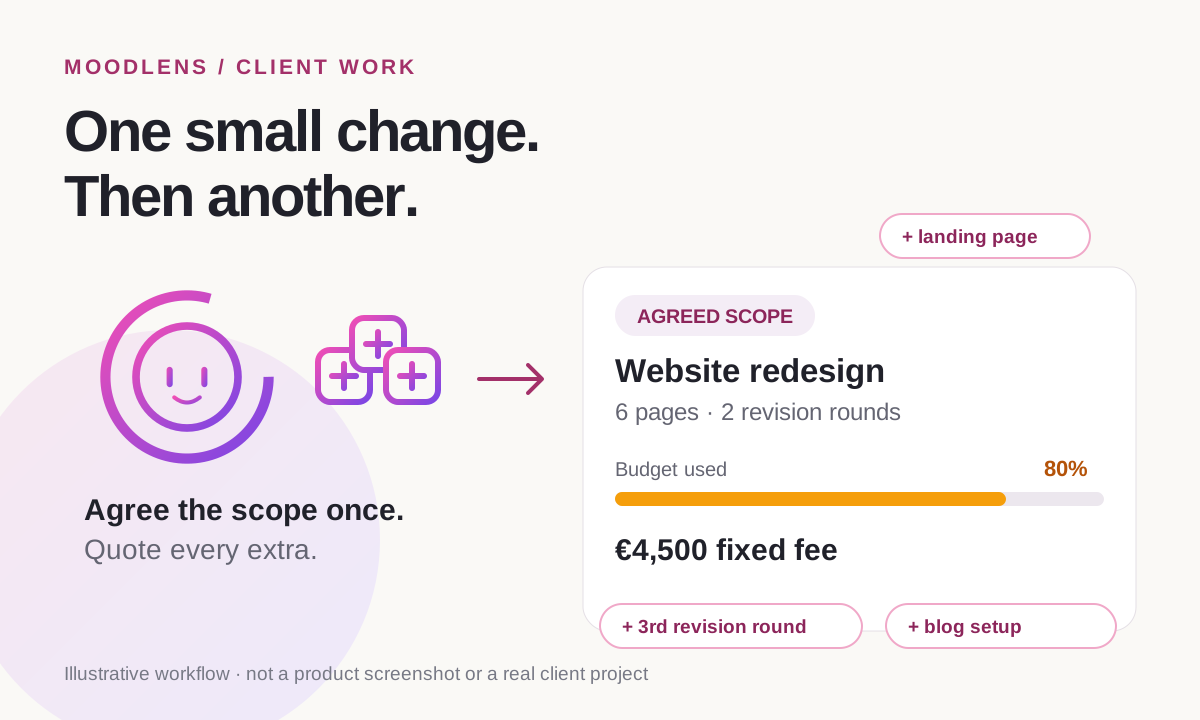
Scope creep is how fixed fees turn into free work
Scope creep is the slow growth of a project beyond what was agreed, without the price or the deadline growing with it. It rarely arrives as one big demand. It arrives as “one quick change”, “a small extra page” or “just one more round of edits”, each too small to argue about on its own.
It is one of the most common reasons client projects lose money. The figures below come from different sources and years, and some are vendor surveys, but they point the same way: most projects drift, and most of the drift is never billed.
- Scope creep is not always the client’s fault. Vague proposals, unlimited revisions and a habit of saying yes on calls all invite it.
- Change is normal. Scope creep is change that nobody priced.
| Finding | Figure | Source |
|---|---|---|
| Projects that experienced scope creep or uncontrolled changes | 52% | PMI, Pulse of the Profession 2018 (up from 43% five years earlier) |
| Agencies losing $1,000 to $5,000 a month to unbilled work | 57% | Ignition 2025, 273 agency leaders (vendor survey) |
| Agencies saying scope creep costs them more than $5,000 a month | 30% | Ignition 2025 |
| Agencies that rarely or only sometimes charge for out-of-scope work | 78% | Ignition 2025 |
| Versions a creative piece goes through before sign-off, on average | More than 3 | Filestage 2023, 366 marketers and creatives (vendor survey) |
Why scope creep happens
Most clients are not trying to get free work. Their idea of the project grows as they see it take shape, and if the agreement does not say where the edges are, every new idea looks as if it was always included.
A few patterns account for most of it:
- Vague deliverables: “a new website” can mean five pages or fifty.
- No list of exclusions, so anything not explicitly ruled out feels included.
- Unlimited revisions, or a number mentioned on a call but never written down.
- No agreed process for new requests, so each one becomes a negotiation.
- Saying yes in the moment to protect the relationship, then working evenings to absorb it.
Write a scope of work that ends the argument before it starts
A scope of work is a short document that says what you will deliver, what you will not, how the work will be approved and how changes are handled. On its own it is not a contract. Most freelancers include it in the proposal the client approves, or attach it to the contract.
The most valuable part is often the shortest: the list of what is out of scope. It turns a future argument into a reference both sides already agreed to.
SCOPE OF WORK Project: [Project name] Client: [Client name and billing contact] Provider: [Your name or business] Start date: [Date] · Target delivery: [Date] 1. Goal [One or two sentences on what the project should achieve for the client.] 2. Deliverables - [Deliverable 1: description, format and quantity] - [Deliverable 2: description, format and quantity] - [Deliverable 3: description, format and quantity] 3. Out of scope - [Work that is not included, for example copywriting, hosting or third-party integrations] - Anything not listed under Deliverables. 4. Revisions [Number] revision rounds per deliverable are included. Further rounds are billed at [rate]. 5. Timeline and client inputs - [Milestone]: [date] - The client provides [content, access, feedback] by [date]. Late client inputs move the timeline. 6. Acceptance Each deliverable is accepted when [criteria], or [number] business days after delivery if no feedback is received. 7. Change requests New requests are quoted in writing with their price and effect on the timeline. Work on a change starts after the client approves the quote. 8. Fees and payment [Fixed fee or rate], payable [schedule, for example 50% upfront and 50% on delivery]. Invoices are due within [number] days. Approved by: [Client name, date] · [Your name, date]
Replace every bracket with specific, countable details. If you cannot count it, a client can stretch it: “two revision rounds per page” survives a disagreement, while “reasonable revisions” does not.
This template is a starting point, not legal advice. Have a lawyer review your templates for larger projects or work that carries legal or regulatory risk.
Price changes before anyone asks for them
The easiest moment to agree how extras are priced is before the first extra is requested. Once a client is mid-project and excited about a new idea, the same conversation can feel like a confrontation.
Settle these points in the scope and the contract:
- Revision rounds: how many are included per deliverable, and the rate for any further round.
- An hourly or day rate for out-of-scope work, so a quote is simple maths rather than a negotiation.
- A minimum charge for small changes, so ten “two-minute” edits do not quietly cost you an afternoon.
- A contingency in your estimate. Payoneer suggests a buffer of around 15% for estimating errors, which is different from absorbing new work.
- What happens to the deadline when the scope grows. Extra work usually means a later date, not a faster pace.
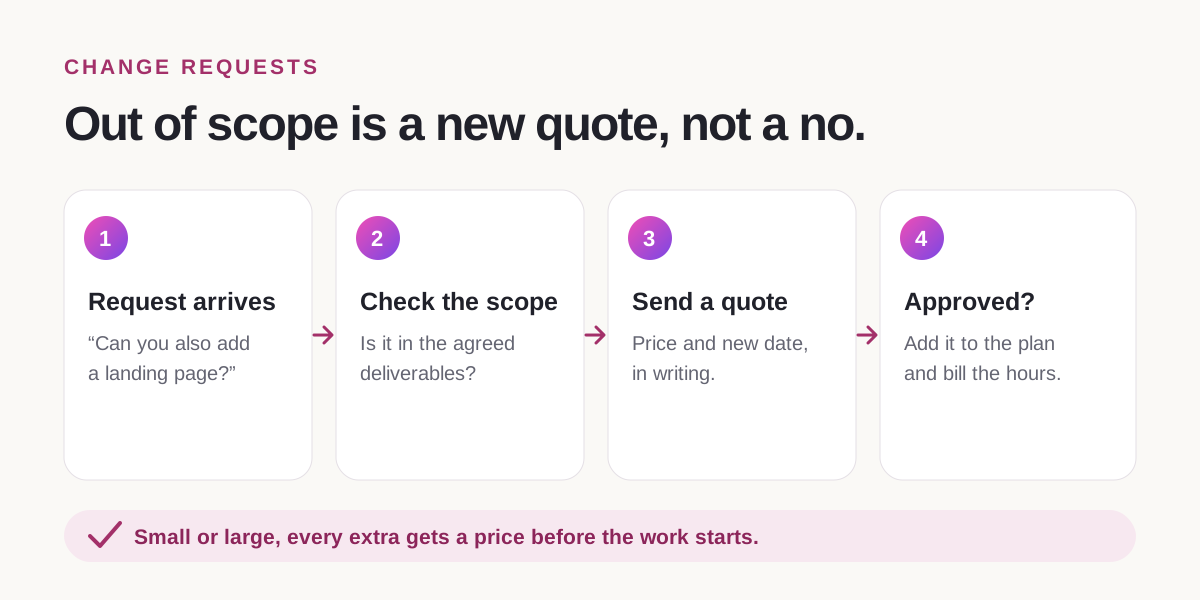
What to say when a client asks for more
A good reply avoids two extremes: a silent yes you resent later, and a flat no that damages the relationship. Acknowledge the idea, point to the agreed scope and offer a priced option. That turns the request into a decision for the client.
- Reply in writing, even after a call, so the decision and the price are on record.
- If you choose to do something for free, say so explicitly: “I’ll include this one at no charge.” Otherwise it quietly becomes the new baseline.
| Situation | What to say |
|---|---|
| A small extra mentioned on a call | “Good idea. It’s outside what we agreed, so I’ll send you a quick quote after the call and you can decide.” |
| A new deliverable | “Happy to add the landing page. It isn’t in the current scope, so here’s the price and how it moves the delivery date.” |
| A third round of revisions | “We’ve used the two rounds included for this page. Another round is [rate]. Shall I go ahead?” |
| “It should only take five minutes” | “Small changes have a [minimum] charge. I can batch a few together so it’s worth it for you.” |
| A request that changes the direction | “This changes the brief, so let’s re-scope it properly. I’ll send an updated scope with the new price and timeline.” |
Track scope while the work is happening
Scope creep is easiest to fix early. Compare the hours you have spent with the hours the budget allows while the project is running. If design has used 80% of its budget and the homepage is still not approved, you have a scope conversation to have now, not a loss to discover when you invoice.
Log time against tasks as you work instead of reconstructing it at the end of the week. Untracked “quick fixes” are where most invisible scope creep hides.
When scope creep has already happened
If the project has already drifted, you still have options. Choose based on the size of the gap and how much the client relationship is worth to you.
- Absorb it once, and say clearly that future changes will be quoted.
- Re-baseline: send an updated scope with the new deliverables, price and dates for approval.
- Bill the extra hours, if your agreement includes a rate for out-of-scope work.
- Pause new work until the updated scope is approved.
- Part ways with clients who keep pushing for unpaid work after the boundaries are clear.
How MoodLens keeps the scope fixed
MoodLens To-do keeps the agreement and the work in the same place, so the scope you agreed is the scope you track against.
Start with a proposal that lists the deliverables, exclusions, timeline and price. Your client opens it from a secure link, verifies their email with a one-time code and approves it without creating an account. MoodLens records who approved it and when. If you switch on the option before sending (it is off by default), the approval also creates a contract draft.
Turn the agreed scope into a contract with the built-in statement of work template, and have your client sign it electronically. Once the work starts, run timers on each task. The budget meter compares billable time with the project budget and turns orange at 80% and red at 100%. Studio flags those projects as at risk or over budget.
On the Plus and Pro plans, you can share a live client view of the project. Clients send feedback from it as “Looks good”, “Question” or “Change request”, so new requests arrive in writing instead of in passing. When an extra is approved, add it to the plan and bill the tracked hours on the next invoice.
- MoodLens has no dedicated change-order tool or revision-round counter. Write your revision limit and change process into the scope and the contract.
- The budget meter is a visual signal on the board and in Studio. It does not send automatic over-budget alerts.
- The meter needs a project budget, hourly rates and running timers to be accurate.
- Client sharing, including change requests from the client view, is available on Plus and Pro.
- Templates and contracts are not legal advice. Review them for your jurisdiction.
A scope agreed in chat vs. a scope the client approved
| Category | MoodLens | Agreed in chat |
|---|---|---|
| Where the scope lives | An approved proposal and a signed statement of work | Scattered across messages and calls |
| What “done” means | Written deliverables and acceptance criteria | Whatever the client remembers |
| Revisions | A set number of rounds in the agreement | Until the client stops asking |
| Extra requests | Checked against the scope and quoted | Absorbed to keep the peace |
| When you notice the drift | At 80% of the budget, when the meter turns orange | When the project is already losing money |
Frequently asked questions
What is scope creep?
Scope creep is when a project grows beyond what was agreed, through extra features, deliverables or revision rounds, without the price or deadline being adjusted. Each request usually looks small, which is why the total goes unnoticed until the project is already over budget.
Is scope creep always the client’s fault?
No. Vague deliverables, missing exclusions, unlimited revisions and agreeing to requests on calls without writing them down all invite it. A clear scope protects both sides, because the client also knows exactly what they are paying for.
How many revision rounds should I include?
Many freelancers include two rounds per deliverable and bill further rounds at an agreed rate. The right number depends on the work, but it should be a number written into the scope and the contract, not “reasonable revisions”.
What is the difference between a scope of work and a statement of work?
The terms are often used interchangeably. A scope of work usually describes the deliverables, exclusions and acceptance criteria. A statement of work is often a more formal document that also covers the timeline, payment and responsibilities, and is attached to or forms part of the contract.
How do I say no to extra work without losing the client?
Instead of saying no, say what it costs. Acknowledge the idea, point to the agreed scope and send a written quote with the price and the effect on the deadline. The client decides, and if they say yes, you are paid for the work.
Does MoodLens track scope creep?
It helps you see it early. Clients approve the proposal from a verified email, the agreed scope can become a signed statement of work, and the budget meter turns orange at 80% and red at 100% of the project budget based on tracked time. MoodLens has no dedicated change-order tool or revision counter, so put your revision limit and change process in the scope.
Related MoodLens workflows
Sources and methodology
Figures come from the reports linked below. Several are published by companies that sell project, billing or review tools and are labelled as vendor data. MoodLens features were checked against the product in October 2026. The template is a starting point, not legal advice.