Most freelancers look at the monthly price of a billing tool and stop there. The fee taken from every payment matters as much, and with Bonsai it depends on how your client pays, which payment account you use and where your client is. This guide puts Bonsai’s published fees in one table and works through a $2,000 invoice.
The short answer
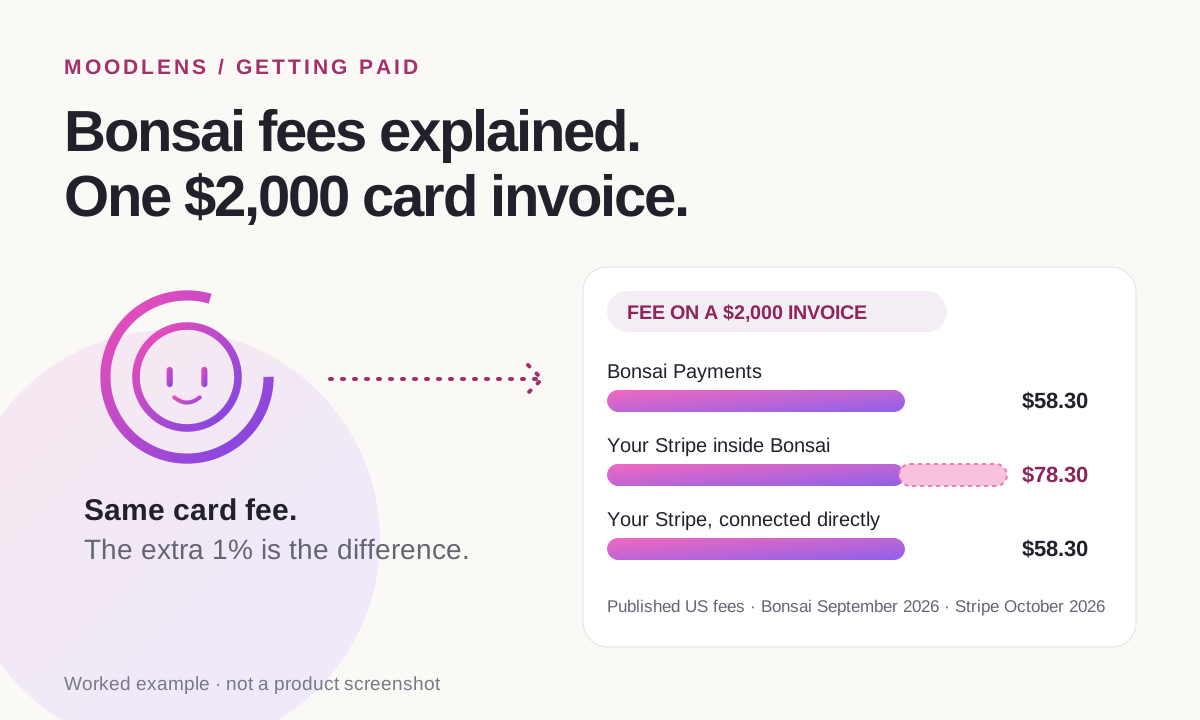
As of September 2026, Bonsai Payments charges 2.9% + $0.30 per card payment, 3.25% + $0.30 for American Express and 1% (minimum $1) for bank transfers (ACH). Where Bonsai Payments is available (the US, the UK, Canada and Australia), getting paid through your own Stripe or PayPal instead adds a 1% platform fee, and online payments from abroad carry a 2.5% foreign-exchange fee. On a $2,000 card invoice that is $58.30 with Bonsai Payments, or $78.30 through your own Stripe account inside Bonsai. Connected directly to Stripe, the same payment costs Stripe’s standard $58.30.
From invoice to money in your account
- 1Invoice sent
- 2Client pays
- 3Fees taken
- 4Payout
- 5Money in your bank
Bonsai’s payment fees in one table
Bonsai publishes its fees in its help center. Here they are together, as they appeared in September 2026.
| How you get paid | Fee |
|---|---|
| Card (Visa, Mastercard and others) with Bonsai Payments | 2.9% + $0.30 |
| American Express with Bonsai Payments | 3.25% + $0.30 |
| Bank transfer (ACH) with Bonsai Payments | 1% ($1 minimum) |
| Your own Stripe or PayPal, where Bonsai Payments is available | An extra 1% platform fee (1.35% for American Express on Stripe) |
| Online payment from another country | A 2.5% foreign-exchange fee |
| Instant payout | An extra 1.5% |
| Wire transfer or cheque, outside Bonsai | No Bonsai fee |
Bonsai Payments is available in the US, the UK, Canada and Australia. Elsewhere, Bonsai uses Stripe Payments through a Stripe sub-account hosted by Bonsai. Bonsai can also pass processing fees on to your client.
A worked example: one $2,000 invoice
Here is what a single $2,000 card payment from a client in your own country costs, using each company’s published US fees.
| How you get paid | Fee | You receive |
|---|---|---|
| Bonsai Payments | $58.30 | $1,941.70 |
| Your own Stripe account inside Bonsai (card fee + 1%) | $78.30 | $1,921.70 |
| Your own Stripe account connected directly | $58.30 | $1,941.70 |
On a domestic card payment, Bonsai Payments costs the same as Stripe’s standard rate. The difference appears when you want to keep your own Stripe or PayPal account: inside Bonsai that adds 1%, which is $20 on this invoice and $200 on $20,000 of card payments a year.
If your client pays from another country
Payments from abroad add a second fee, and each company publishes a different one.
- Bonsai adds a 2.5% foreign-exchange fee to Bonsai Payments or Stripe Payments invoices paid internationally: $50 on a $2,000 invoice, on top of the card fee.
- Stripe’s own US pricing adds 1.5% for international cards, plus 1% only when a currency conversion is needed: $30 to $50 on the same invoice.
- Invoicing in the currency your payment account pays out in avoids a conversion fee on your side; your client’s bank may still convert on theirs.
How to keep more of each invoice
Whatever tool you use, a few habits lower what each payment costs you:
- Know which fee applies before you send the invoice: card, bank transfer or a payment from abroad.
- For large invoices, a bank transfer is usually cheaper than a card. Bonsai Payments charges 1% for ACH ($1 minimum); Stripe’s own US price for ACH Direct Debit is 0.8%, capped at $5.
- Decide who pays the processing fee and say so in the contract, where the law allows passing it on.
- Count the monthly subscription too. The fee per payment is only part of what getting paid costs.
How MoodLens To-do handles payments
MoodLens To-do connects your own Stripe account. Your client pays the invoice by card from a secure link, the money goes into your Stripe account and Stripe’s own rates apply. MoodLens adds no platform fee and no foreign-exchange fee of its own. Clients can also pay with crypto, or by bank transfer that you mark as paid.
- Stripe’s fees still apply, including its international card and currency conversion fees.
- Payouts follow your own Stripe account’s schedule, and new Stripe accounts can wait longer for their first payout.
- MoodLens has a Free plan; Plus costs $19.99 a month or $15.99 billed yearly.
- There is no direct import from Bonsai. Add your active clients and start with your next invoice.
Getting paid: Bonsai and MoodLens To-do
| Category | MoodLens | Bonsai |
|---|---|---|
| Card payment fee | Stripe’s standard rate (US: 2.9% + $0.30) | Bonsai Payments: 2.9% + $0.30 |
| Using your own Stripe | Stripe’s standard rate, no platform fee | An extra 1% platform fee where Bonsai Payments is available |
| Payment from abroad | Stripe’s international card and conversion fees only | An extra 2.5% foreign-exchange fee |
| Where the money goes | Your own Stripe account | Bonsai Payments, or a Stripe sub-account hosted by Bonsai |
Frequently asked questions
Does Bonsai charge a fee on payments?
Yes. As of September 2026, Bonsai Payments charges 2.9% + $0.30 per card payment, 3.25% + $0.30 for American Express and 1% (minimum $1) for ACH bank transfers. Instant payouts cost an extra 1.5%.
What is Bonsai’s 1% platform fee?
In the US, the UK, Canada and Australia, where Bonsai Payments is available, Bonsai adds a 1% platform fee if you get paid through your own Stripe or PayPal instead (1.35% for American Express on Stripe).
Does Bonsai charge for international payments?
Yes. Bonsai adds a 2.5% foreign-exchange fee to Bonsai Payments or Stripe Payments invoices that are paid internationally.
How long do Bonsai payouts take?
With Bonsai Payments in the US, new accounts start on limited payouts of 7 to 10 business days and move to standard payouts of 2 to 4 business days as they build history. Instant payouts cost an extra 1.5%.
Does MoodLens To-do charge a fee on payments?
No. MoodLens connects your own Stripe account, so you pay only Stripe’s own fees. MoodLens adds no platform fee and no foreign-exchange fee.
Related MoodLens workflows
Sources and methodology
Bonsai fees and payout times come from Bonsai’s help center (pages dated 18 September 2026 and 22 June 2026). Stripe fees are Stripe’s standard US pricing as published on 24 October 2026. Fees vary by country and change over time, so check each page before deciding. MoodLens features were checked against the product in October 2026.