Projects·Backlog

A backlog that stays readable as it grows

Keep unscheduled work in one filterable list with saved presets for assignee, due date, priority, type and review status.

Free forever plan. No credit card.

In this feature

Named saved filters
01
Story points
02
Review status
03
Task types
04
Sprint capacity
05

On this page

Plate 00 · BacklogEverything accepted but not yet scheduled, in one list that stays readable as it grows.
The MoodLens backlog listing unscheduled work with priorities and dates
01

Name a filter, save it, make it your default

Build the view you keep needing — unassigned high-priority bugs, everything awaiting review — then name it, save it and set it as your default. The count of matches updates as you narrow, so you know what you are looking at.

See it below
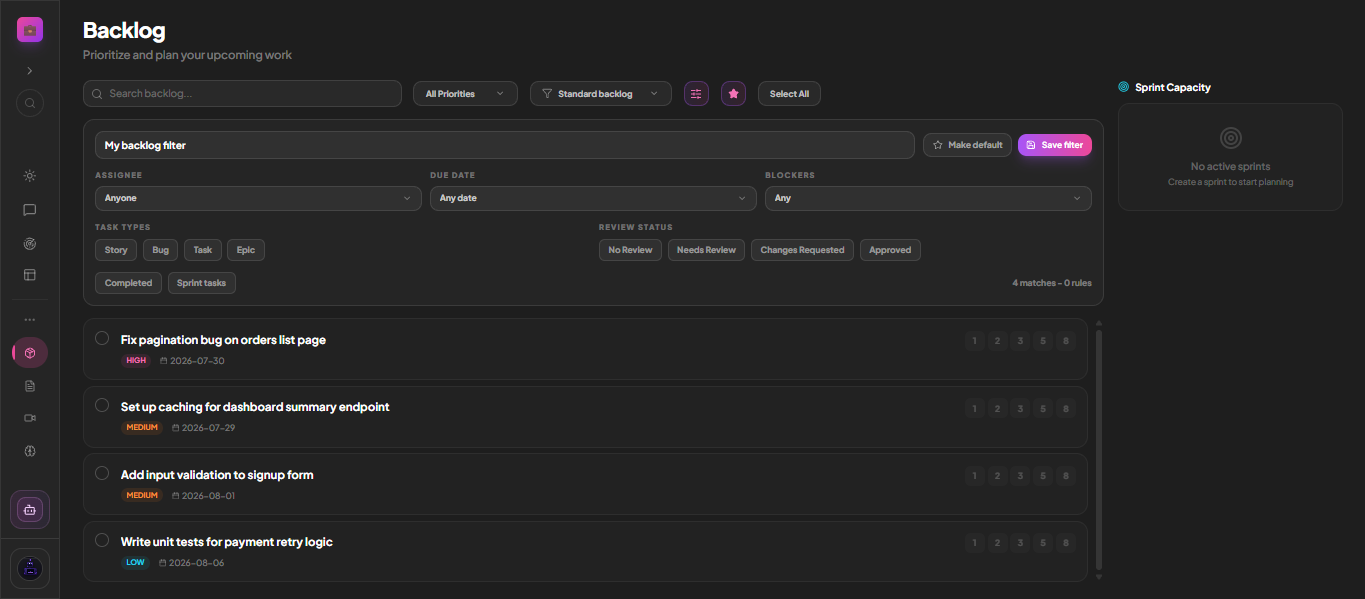
Plate 01 · Continues 01A saved filter with assignee, due date, blockers, task types and review status — and a live match count.
A named saved backlog filter in MoodLens with task type and review status controls

What to look for

  • Assignee, due date and blockers filters
  • Task types: Story, Bug, Task, Epic
  • Completed and sprint-task toggles
  • Save a named filter and make it default
  • Live match count as you narrow
02

Review status is a first-class filter

Work moves through No Review, Needs Review, Changes Requested and Approved. That means "what is waiting on me to sign off" is a filter rather than a question you ask in chat.

Detail

  • No Review, Needs Review, Changes Requested, Approved
  • Filter the backlog by review state
  • Pairs with client approvals in the portal
03

Points and capacity while you plan

Each row carries a Fibonacci point scale and the sprint capacity panel sits alongside, so pulling work into the next sprint is a decision made against a number rather than a feeling.

  • Fibonacci story points per row
  • Sprint capacity panel beside the list
  • Select-all and bulk operations
  • Push straight into a sprint

Straight answer

What is the difference between the backlog and a board column?

A board column is part of an active delivery flow. The backlog holds work that is accepted but not yet scheduled into a sprint or a column.

Run the whole client lifecycle in one workspace.

Backlog is one part of it. Plan the work, keep clients informed, track the budget and get paid — without another subscription.

Start free

Free to start. No credit card required.