Communication·Team chat

Team chat that lives beside the project

Channels, mentions, reactions, pinned messages and scheduled sends — with a one-click path from a conversation to an actual task.

Free forever plan. No credit card.

Plate 00 · Team chatChannels sit beside the boards and docs they are about, with live presence and a member list on the right.
A MoodLens workspace channel with presence, member list and message composer
01

Catch me up: Highlights, Decisions, Action items, Risks

Come back from a day of client meetings and press one button. Moody reads the channel and returns a structured brief — not a paragraph of summary, but the four things you actually need: what happened, what was decided, what you owe, and what is going wrong.

See it below
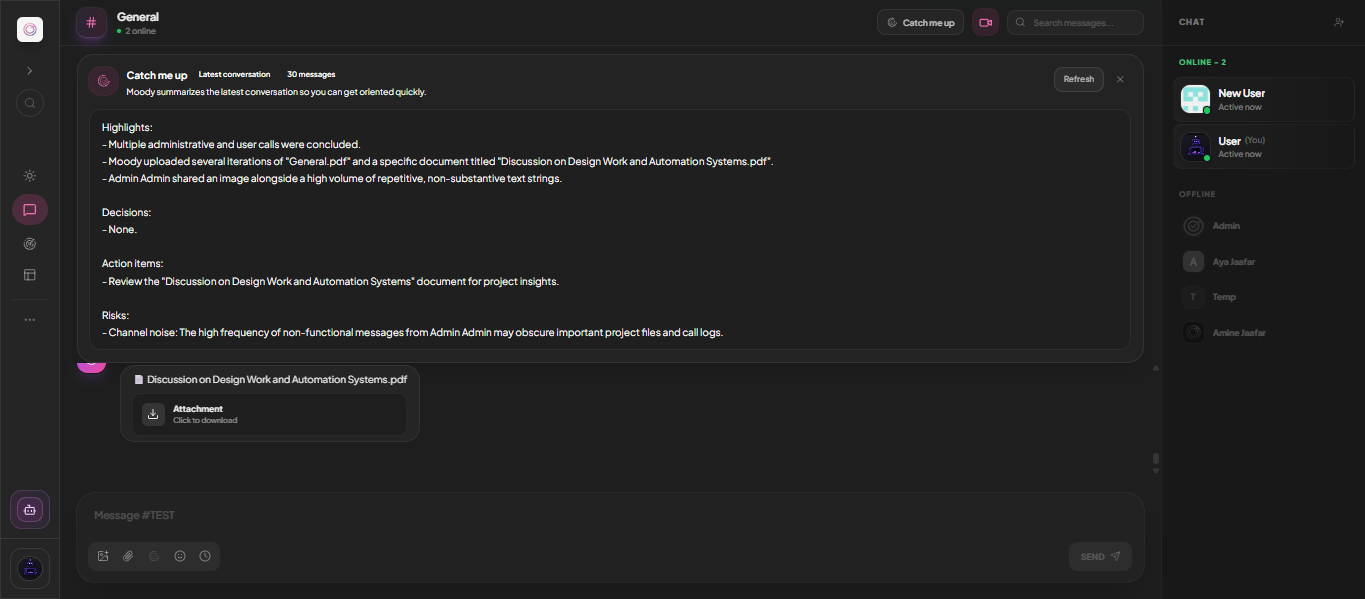
Plate 01 · Continues 01Thirty messages compressed into four headings you can act on.
The Catch me up brief in MoodLens showing highlights, decisions, action items and risks

What to look for

  • Highlights of what happened while you were away
  • Decisions, listed explicitly — or "None"
  • Action items assigned to you
  • Risks, including channel noise drowning real work
  • Tells you how many messages it read
  • Refresh to re-run on the latest conversation
02

Conversation that does not lose the decision

Pin the message that settled it, mention the person who owns it, and keep the thread attached to the workspace where the work is happening — not in a separate product that forgets which project it belonged to.

Capabilities

  • 01Public and private channels
  • 02@mentions with notifications
  • 03Reactions and pinned messages
  • 04Message editing and full history
  • 05Attachments, images and emoji
  • 06Live presence and typing indicators
03

Turn talk into tasks, or into a call

Select a conversation and convert it into structured tasks, or start a video call from the channel header when typing stops being efficient. The context that produced the work stays linked to it.

Detail

  • Chat-to-tasks conversion
  • AI rewrite assist on your drafts
  • Scheduled messages for other time zones
  • Start a call from any channel header
  • Search across message history

Straight answer

Does this replace Slack?

For project conversation, yes — that is the point of keeping it beside the work. MoodLens also connects to Slack if your organisation keeps it for company-wide chat.

Run the whole client lifecycle in one workspace.

Team chat is one part of it. Plan the work, keep clients informed, track the budget and get paid — without another subscription.

Start free

Free to start. No credit card required.