Projects·Templates

Templates for the projects you run repeatedly

Save a board structure or a document as a template and start the next engagement already set up, instead of rebuilding it from memory.

Free forever plan. No credit card.

In this feature

9 built-in templates
01
Column previews
02
Doc templates
03
System Packs
04

On this page

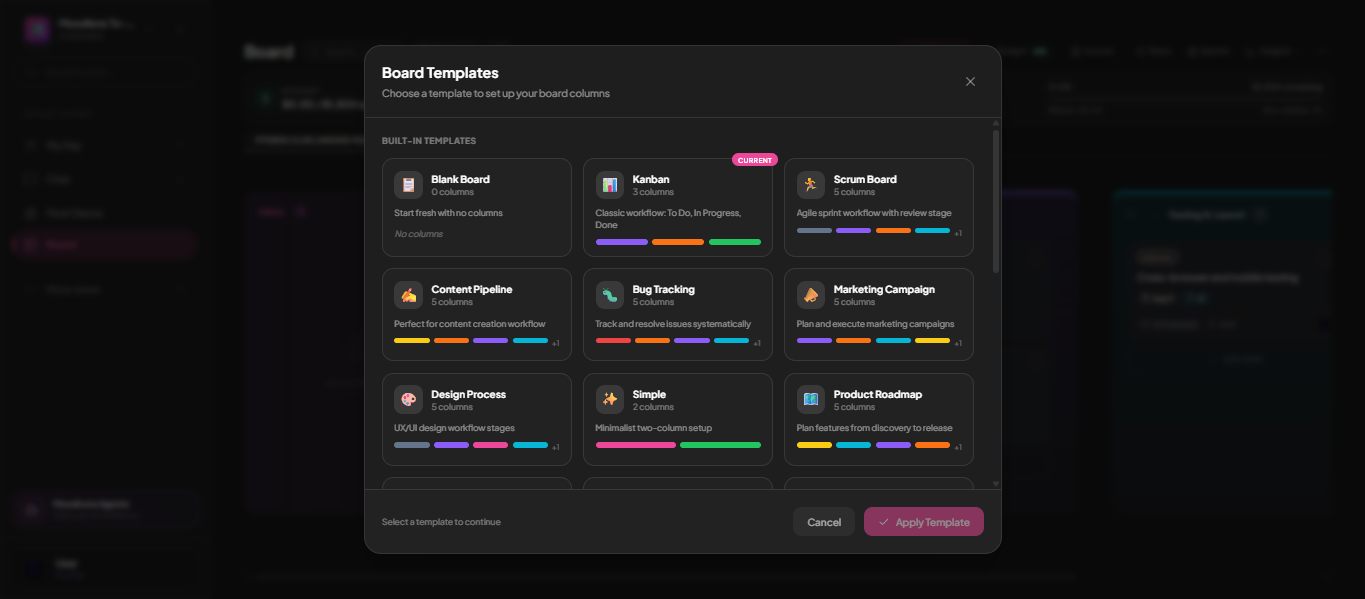
Plate 00 · TemplatesNine built-in templates ship with the product — Kanban, Scrum, Content Pipeline, Bug Tracking, Marketing Campaign, Design Process, Product Roadmap — each previewing its columns before you apply it.
The MoodLens board template gallery showing built-in templates with column counts
01

Nine ways to start, none of them blank

Kanban, Scrum, Content Pipeline, Bug Tracking, Marketing Campaign, Design Process, Product Roadmap, Simple, or genuinely blank. Each shows its column count and a colour preview of the stages before you commit, so you are choosing a process rather than guessing at a name.

Included

  • 01Nine built-in board templates
  • 02Column count and colour preview per template
  • 03Your current template marked so you know where you are
  • 04Applies to an existing board, not just a new one
  • 05Save your own once a shape proves itself
02

System Packs bundle more than layout

A System Pack can carry board structure, documents, automations and AI employee configuration together — a whole way of working, installable in one step.

Detail

  • Bundled automations and AI configuration
  • Installable into any workspace
  • Build and publish your own

Straight answer

Can I share a template with my team?

Yes. Templates are saved to the workspace, so everyone with access can start from them.

Run the whole client lifecycle in one workspace.

Templates is one part of it. Plan the work, keep clients informed, track the budget and get paid — without another subscription.

Start free

Free to start. No credit card required.