System Packs turn a working MoodLens AI team into a reusable operating system: AI Employees, prompts, knowledge, compatible automations, required setup details, and shared playbooks ready to install in another workspace.
System Packs
MoodLens System Packs: Reusable AI Operating Systems
Quick answer
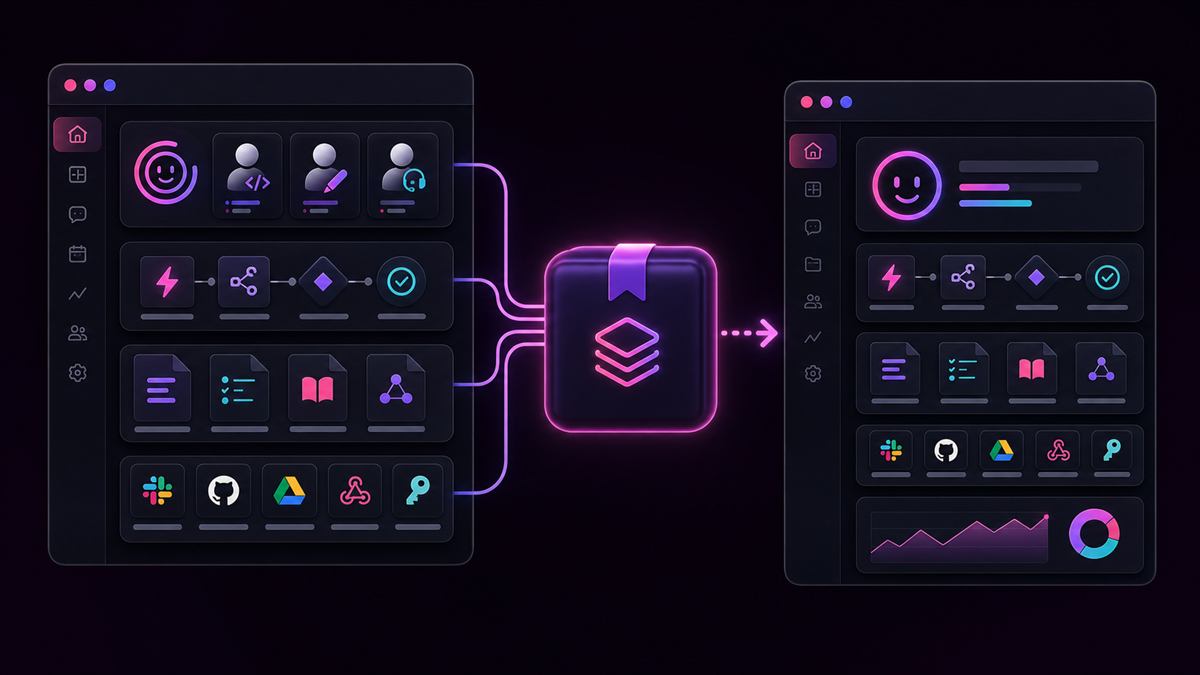
MoodLens System Packs let you package a complete AI working system: AI Employees, role setup, prompts, permissions, knowledge, compatible automations, required secret placeholders, and shared team playbooks into one reusable pack.
You can export a System Pack as a private file, publish it as a public install page with version history, or install it into another MoodLens workspace. In plain terms: a System Pack turns a working AI team into a reusable AI operating system.
What is a MoodLens System Pack
A MoodLens System Pack is a portable setup for an AI-powered workspace. Instead of rebuilding AI Employees, prompts, automation rules, playbooks, and knowledge setup every time you start a new workspace, you package the system once and reuse it.
A System Pack can represent a marketing execution system, sales follow-up system, content production team, customer support operating model, founder assistant stack, client onboarding workflow, or full AI employee team for a specific business function.
Why teams need more than templates
Most AI tools make teams repeat the same setup work again and again. You create an assistant, write a system prompt, define its role, explain company context, connect workflows, add rules, test it, improve it, and then repeat the same process for another workspace.
That is not how strong operations should work. If your AI setup is valuable, it should be reusable. MoodLens lets teams move from "I made an AI assistant" to "I built a repeatable AI operating system".
What goes inside a System Pack
A System Pack can include the core pieces that make an AI workspace actually work. The exact contents depend on what the pack creator chooses to include.
- Selected AI Employees with names, roles, categories, template identity, personality, language, icons, voice settings, skill configuration, permissions, and prompts.
- Employee knowledge such as role instructions, standard operating procedures, brand rules, research summaries, client knowledge, and source-based insights.
- Compatible automations, including scheduled, event-based, webhook-based, template, custom, and manual automations.
- Shared workspace playbook rules such as approval rules, escalation paths, definitions, onboarding steps, recurring procedures, and quality standards.
- Required secret names so installers know which credentials they need to configure without exposing secret values.
What System Packs do not include
System Packs are designed to be reusable without leaking private workspace data. The pack can include selected AI Employee knowledge and distilled source notes, but it does not ship the private workspace itself.
- Secret values, live credentials, runtime tokens, and existing webhook URLs.
- Chat history, automation run logs, member data, raw workspace files, private docs as objects, or workspace tasks.
- Obvious credential patterns inside prompts, knowledge blocks, automation instructions, or shared playbooks.
Private export and public pack pages
MoodLens gives System Packs two sharing paths. You can download a private `.moodlens-todo-pack.json` file and send it directly to a teammate, client, consultant, workspace owner, or another account you manage.
You can also publish a System Pack to the web. A public pack page can include a pack name, description, source workspace label, employee count, automation count, required secret names, version history, release notes, install count, download button, and open-in-MoodLens install link.
Version history and upgrades
System Packs are built for systems that evolve. You can publish a first version, then publish new versions later as the system improves. A new version might add employees, improve prompts, remove outdated workflows, update automation instructions, or clarify setup.
When a newer pack is installed in a workspace that already uses it, MoodLens can treat the install as an upgrade. It can update pack-managed employees and automations instead of blindly duplicating everything.
What happens during install
When a System Pack is installed into a workspace, MoodLens uses a secure backend importer. The importer validates the pack, checks plan and employee limits, recreates selected AI Employees, restores prompts and knowledge, recreates compatible automations, links automations to imported employees, merges shared playbook knowledge, and generates fresh webhook credentials where needed.
The important detail is that webhooks are not copied as old live URLs. Webhook-based automations receive fresh URLs in the destination workspace.
System Packs for agencies, consultants, and internal teams
System Packs are especially strong for agencies and consultants. An agency can build a proven AI operating model once, then reuse it across clients: marketing launch packs, lead response workflows, support triage systems, client onboarding assistant teams, weekly reporting systems, and founder operations packs.
Internal teams can use System Packs to standardize how work gets done across departments. Sales, product, support, marketing, operations, and founder teams can package their best AI workflows and install them wherever the pattern should repeat.
System Packs make MoodLens more than a task app
MoodLens is not only a place to track tasks. With AI Employees, automations, shared knowledge, meetings, docs, and System Packs, MoodLens becomes a place where teams design how work should happen, then let AI Employees help run that system.
A task app stores work. An AI chat app answers questions. A workflow tool triggers actions. MoodLens System Packs package the whole working model so it can be reused.
Best use cases
System Packs are strongest anywhere a team has built a workflow that should be reused rather than rebuilt.
- Client delivery packs for agencies and consultants.
- Department templates for marketing, sales, support, product, or operations.
- Creator products published as reusable public AI workflow resources.
- Internal enablement packs that replace long onboarding documents.
- Startup launch systems, founder operations packs, and multi-location operating models.
FAQ
What is a MoodLens System Pack? It is a reusable AI operating system for a workspace. It can package selected AI Employees, prompts, permissions, knowledge, compatible automations, required secret names, and shared playbook content into one importable or publishable pack.
Does a System Pack include passwords or API keys? No. System Packs include required secret names only, not secret values. MoodLens is designed to avoid publishing live credentials, runtime tokens, old webhook URLs, chat history, automation logs, member data, raw files, or private tasks.
Can I publish a System Pack publicly? Yes. MoodLens can publish a System Pack as a public page with an install link, download button, version history, release notes, employee count, automation count, required secret names, and install analytics.
Are System Packs better than templates? Yes. A template gives a starting structure. A System Pack packages a working AI system with employees, prompts, permissions, knowledge, automations, shared playbook rules, required setup details, and version history.